MyThumbTester guide
Why a YouTube video may not have a maximum-resolution thumbnail
Learn why MyThumbTester only shows a maximum-resolution YouTube thumbnail when that public image actually loads, and what to check when it does not.
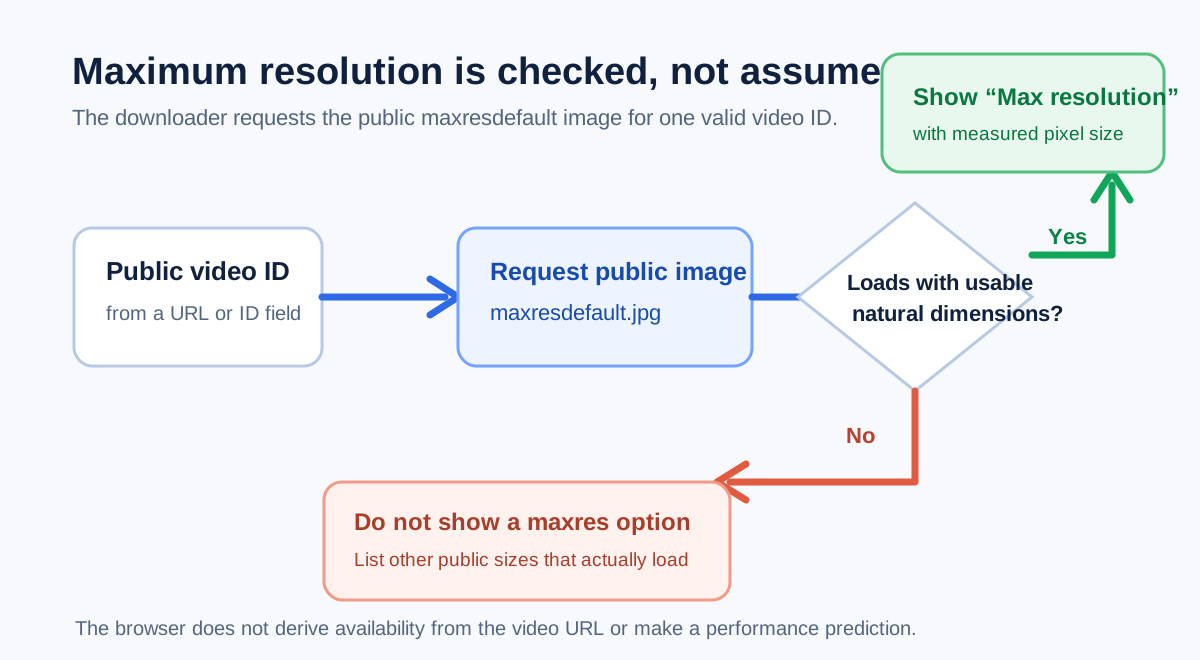
A maxres option appears only when that public image response loads
A public YouTube video may not have a maximum-resolution thumbnail available to MyThumbTester because the downloader shows maxresdefault only after that exact public image loads in the browser with usable natural dimensions. It checks the actual maxresdefault response instead of inferring availability from the video URL. When the response does not produce a usable image, the page leaves the maximum-resolution option out and lets you choose among the other loaded sizes. This is a reproducible behavior of the implemented downloader, not a prediction of click-through rate, ranking, distribution, or views.
The absence of a maxres option means the downloader did not receive a usable public maxresdefault image at that moment. It does not establish why YouTube did not provide one, and it does not mean that the video itself is unavailable.
What the downloader checks
For a valid public video URL or 11-character ID, MyThumbTester tries five standard public image names: maxresdefault, sddefault, hqdefault, mqdefault, and default. Each candidate is loaded in the browser. Only a candidate that loads and reports natural width and height greater than one is listed with its measured pixel dimensions.
That sequence is useful because it separates an observed available image from a filename that merely sounds larger. A lower-named choice can still be the best available choice for the public video being checked.
Choose the best loaded size, then inspect its crop
If maxresdefault is not listed, download one of the available options or open it in the thumbnail tester. The six illustrative layouts make it possible to check how the image crop and title read in a Home feed, Search, Watch page, Shorts, Mobile, and Sidebar representation before you save a PNG review record.
The downloader handles publicly available thumbnail images only. It does not recover a missing source image, download a video, determine reuse rights, or promise that every platform will display the image in the same way.
What this check cannot tell you
A loaded or missing maxres response is an availability observation, not audience research. It cannot tell you which thumbnail will perform better, how many people will see it, whether the source is licensed for reuse, or whether it will earn more clicks, ranking, distribution, or views. Use the check for a concrete public-image and layout review, then rely on real platform data for performance questions.