MyThumbTester guide
What happens to Version B after you leave a side-by-side thumbnail comparison?
MyThumbTester keeps the browser-decoded Version B during the current page session. Leaving side-by-side mode changes only what the canvas renders.
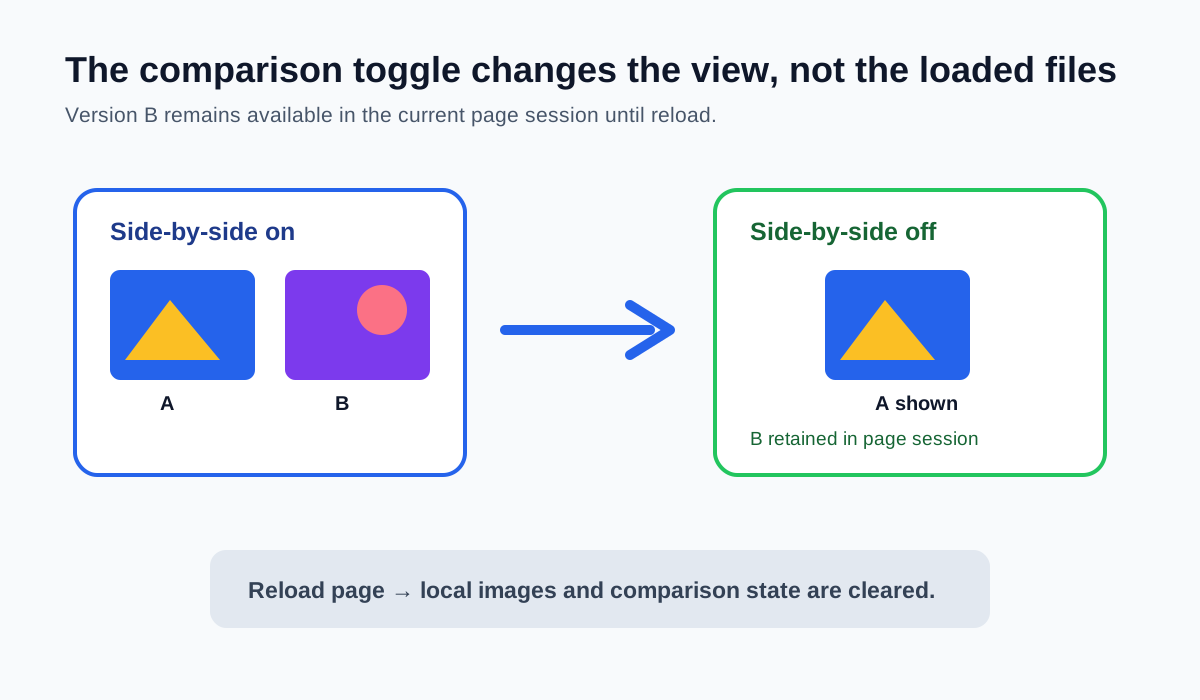
Version B stays loaded in the current browser session; the button only changes the canvas view
After you load Version B and leave side-by-side mode, MyThumbTester keeps that browser-decoded image in the current page session. The control only toggles whether the selected layout renders one version or both fixed versions beside each other. You can turn side-by-side mode back on without selecting Version B again, as long as the page has not been reloaded. This is a reproducible local rendering behavior, not a prediction of click-through rate, ranking, distribution, or views.
The tool labels the two rendered panels A and B when comparison is active. Those labels identify local inputs; they do not mark a winner or represent an audience test.
Why leaving comparison mode does not discard the second file
The tester stores the decoded second image in its in-page comparison state, while the selected layout and current primary image remain available for normal rendering. Switching the comparison button off sets the rendering mode to one version; it does not erase the already decoded Version B image.
This makes it possible to inspect the same layout alone, then return to the same two local inputs side by side without changing the title or reloading either image.
Reloading is the boundary that clears the tool state
A page reload starts a new tool session. The local images and entered fields are not saved as a comparison library, so load Version A and Version B again if you want to repeat the review after reloading. Export a side-by-side PNG before leaving if you need a durable record of the exact local comparison.
The PNG records the current browser canvas. It does not record viewer reactions, establish rights to use either image, or prove that either version will perform better.
Use the toggle for a controlled visual check
Keep the same layout and title when switching from one version to the side-by-side canvas. Note visible differences such as crop, subject size, or title relationship. If your question becomes which version viewers respond to, use a separate eligible platform experiment rather than treating the local toggle as test data.