MyThumbTester guide
How small does thumbnail text become after downscaling?
Calculate the size of text baked into a thumbnail at two MyThumbTester image widths, then inspect the exact file in a local preview.
Multiply the source text height by the image scale
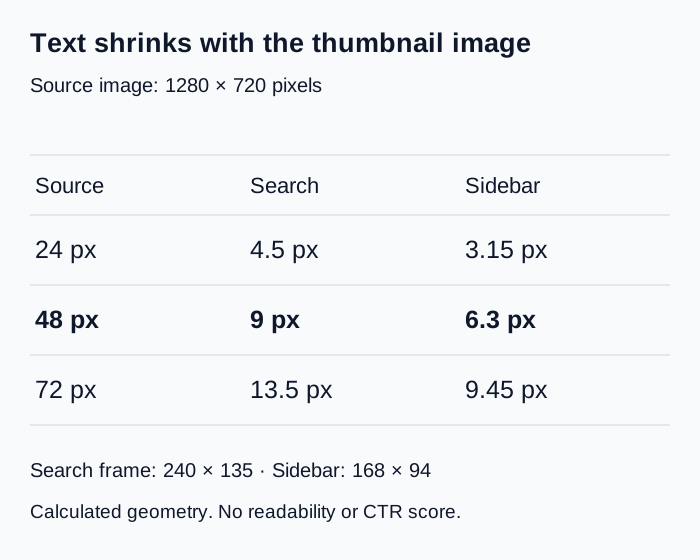
For a 1280 × 720 thumbnail, a text feature that measures 48 pixels high in the source becomes 9 pixels high in MyThumbTester’s 240 × 135 Search image and about 6.3 pixels high in its 168 × 94 Sidebar image. These values come from the implemented center-cover formula: scale = max(frame width / source width, frame height / source height). This calculated example explains why text that looks comfortable in an editor can become difficult to inspect in a smaller preview. It does not predict CTR, rankings, distribution, or views.
Measure the actual letter height in the exported image rather than assuming that a design editor’s font-size setting equals the height of its visible letters. The numbers here describe image geometry; they are not measured reading performance or a recommended minimum font size.
Reproduce the two calculations
Search uses max(240/1280, 135/720) = 0.1875. Multiply a 48-pixel feature by 0.1875 to get 9 pixels. Sidebar uses max(168/1280, 94/720) = 0.13125; multiplying 48 by that scale gives 6.3 pixels. The latter frame trims a fraction of the scaled image vertically because 168 × 94 is not an exact 16:9 rectangle.
For a 24-pixel feature, the corresponding heights are 4.5 and 3.15 pixels. For a 72-pixel feature, they are 13.5 and 9.45 pixels. These are calculated heights before raster rounding, not claims that a viewer can or cannot read the letters.
Check the actual thumbnail after calculating
Load the exact local image into the thumbnail tester, keep its title fixed, and switch from Search to Sidebar. Inspect the text baked into the image separately from the video title drawn alongside it. The title is drawn at the layout’s own font size; it does not follow the image-text scaling calculation.
Export each layout as PNG to keep a record. Inspect the exported file at its native pixel dimensions when comparing it with the calculation. Browser zoom, display scaling, and the responsive on-page canvas can change apparent size.
Use the calculation to choose a revision
If the image depends on small words, make one alternate file with fewer words or larger letter shapes. Compare both files in the same layout and record only what you can observe. There is no universal readability threshold in this calculation; letter shapes, contrast, display conditions, and the intended audience also matter.