MyThumbTester guide
Review thumbnail contrast in a dark preview
Use the MyThumbTester dark preview to inspect whether the thumbnail, title, and metadata remain distinct without treating the layout as a performance forecast.
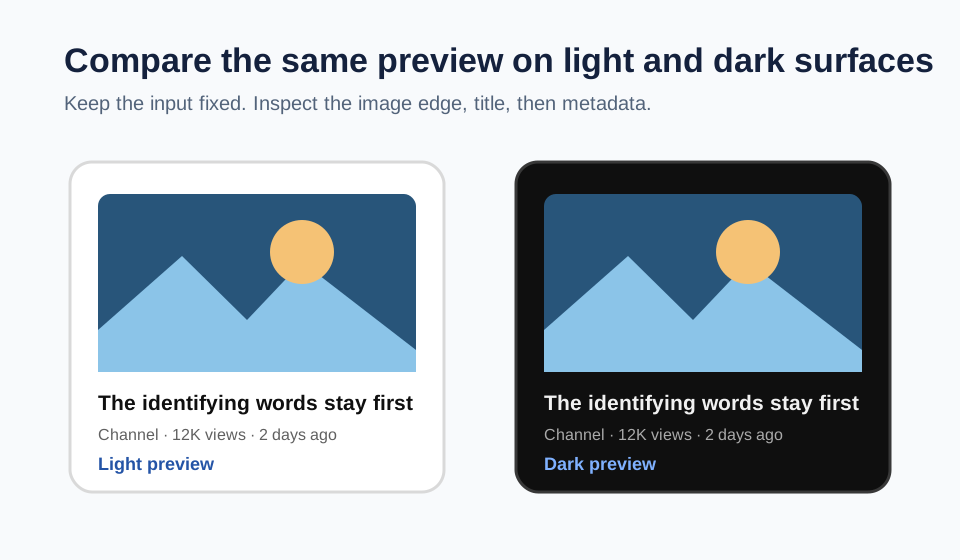
Switch to dark mode and check separation
Use the dark preview after checking the standard light layout. MyThumbTester changes its canvas background to #0f0f0f, primary text to #f1f1f1, secondary text to #aaaaaa, and placeholder cards to #272727. The local thumbnail image itself is not recolored. This gives you a reproducible way to inspect whether the image edge, title, and metadata remain visually separate on a dark surrounding surface; it does not predict click-through rate, ranking, distribution, or views.
Load the local image and exact title, then choose a layout and toggle Dark mode. Look first at the border between the image and its surrounding surface, then read the title, then the metadata. If a dark image appears to merge with the page or the title and metadata no longer have a clear hierarchy, revise the image treatment or shorten the title before exporting the preview.
Keep the input fixed while you compare
Use the same image, title, channel, duration, and metadata values in both theme states. Changing inputs at the same time makes it impossible to tell whether the difference came from the dark surface or from the new content. A fixed input gives the comparison one clear purpose: inspect visual separation.
The preview does not need to copy every detail of a live YouTube screen to make this check useful. It documents how the exact local input sits against the two illustrative MyThumbTester color sets.
Fix the strongest visible conflict first
If the thumbnail edge is hard to find, increase separation in the source image before changing the wording. If the image is clear but the title and metadata compete, move the identifying phrase earlier and remove a weaker clause. Return to the same layout and theme after each single change.
Export the selected PNG once the image, title, and secondary details are visibly ordered. The export is a record of the illustrative presentation you reviewed, not an audience test.
What this dark preview cannot answer
A dark preview cannot confirm the interface settings used by a particular viewer, whether a platform will place a video in a given location, or whether someone will click. Use it only to inspect contrast and hierarchy in the MyThumbTester illustrative color modes.