MyThumbTester guide
Why does a thumbnail preview look smaller than its exported PNG dimensions?
MyThumbTester fits the on-page canvas to its container while PNG export uses the canvas pixel dimensions. Learn which size to check.
The page fits the canvas to available space; export keeps the canvas pixel dimensions
A preview can look smaller on the page because MyThumbTester applies max-width: 100% and height: auto to its canvas. The renderer separately sets the canvas pixel dimensions for the chosen layout, and Download PNG exports that canvas. For example, Home feed uses an 880 × 460 canvas. If its container displays it at 440 CSS pixels wide, its proportional display height is 230 CSS pixels, while its PNG still contains 880 × 460 pixels. That 440-pixel example is a calculation, not a measurement of your current browser. MyThumbTester does not predict CTR, rankings, distribution, or views.
The size label below the preview reports canvas pixels. It does not promise that the page will display one canvas pixel as one CSS pixel, nor does it describe the uploaded source image dimensions.
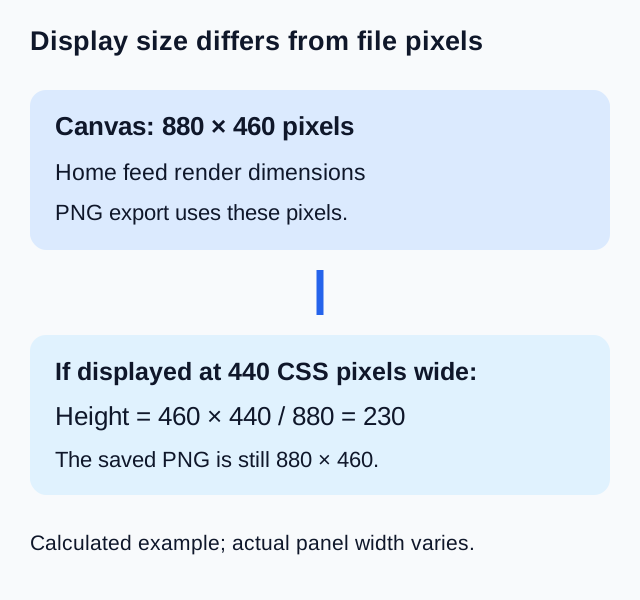
Keep three sizes separate when checking a thumbnail
Your source file has its own width and height. The selected layout then draws that image inside a larger canvas containing titles, placeholder cards, and other context. Finally, responsive page styling may reduce the displayed canvas to fit the available panel width. These three sizes can all differ.
Search and Home feed both export an 880 × 460 canvas, but their image frames are different. Changing the panel width does not change the selected layout into a live mobile YouTube screen. Select Mobile if you want to inspect the tool’s illustrative Mobile arrangement.
Check the downloaded file rather than a screenshot
Load a local image, choose Home feed, and read the pixel dimensions shown below the canvas. Download PNG, then use your image viewer’s file information to inspect the saved width and height. Keep the chosen layout and comparison mode fixed during this check.
A screenshot records the displayed page, including browser scaling and potentially other interface elements. The tool’s PNG download records the current canvas. If a viewer opens that PNG using Fit to window, it may also appear smaller than its file dimensions; use the viewer’s pixel information to resolve the difference.
A larger canvas does not recover source detail
Export dimensions describe the review canvas, not the resolution or sharpness of your original thumbnail. A small source image can be drawn into a larger frame without gaining original detail. Use the preview to inspect presentation, and keep the original source file separately when evaluating image quality.