MyThumbTester guide
How to find the available YouTube thumbnail size for a public video
Use MyThumbTester’s downloader to check which public thumbnail image sizes actually load for a YouTube video, then download one or review it in six illustrative layouts.
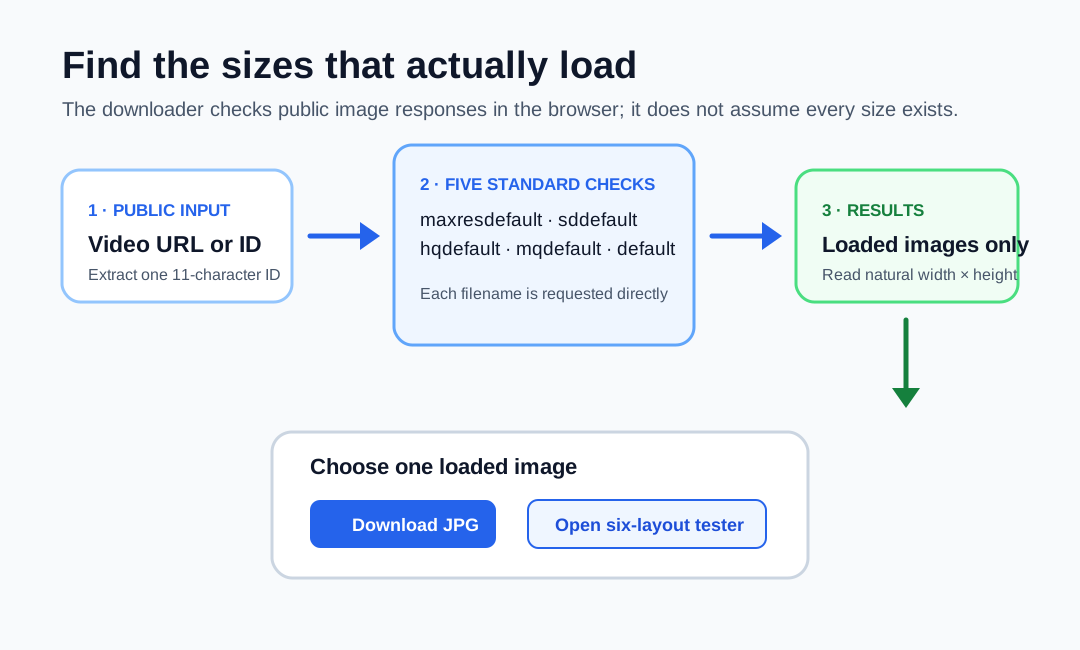
Check the public image responses instead of assuming a size exists
To find the available YouTube thumbnail size for a public video, paste its URL or 11-character video ID into MyThumbTester’s YouTube Thumbnail Downloader. The browser checks five standard public image names—maxresdefault, sddefault, hqdefault, mqdefault, and default—and lists only the images that load. Each listed option shows the image’s natural pixel width and height as read by the browser. This is a reproducible observation of the downloader’s implemented size probe, not a prediction of click-through rate, ranking, distribution, or views.
The checker does not guess a resolution from the filename. A higher-named option appears only after its image response loads, so a video with no available maximum-resolution image is not presented as if it had one.
Why the available sizes can differ between videos
The downloader starts with the same five standard names for every public video, but the results depend on which image files YouTube makes available for that particular video. The page therefore reports what the browser can load at the time of the check, rather than promising that a particular size will be present for every URL.
If no image response loads, recheck the public URL or ID. The downloader handles thumbnail images for public videos; it does not download a video, retrieve private material, or repair a missing source image.
Download the image or send it into a six-layout review
Choose one listed option to download a JPG. If the goal is a visual review, choose Open in thumbnail tester instead. The selected public image moves into the same browser tab, where MyThumbTester renders it in Home feed, Search, Watch page, Shorts, Mobile, and Sidebar layouts. Add the title you want to examine after the transfer.
The transfer keeps only the public video ID and selected image size in browser session storage long enough to load the image, then removes it. MyThumbTester does not proxy or store the downloaded image.
What an available size cannot tell you
A successfully loaded image size only confirms that this public thumbnail response was available to the browser. It cannot show who owns the image, whether you have permission to reuse it, how YouTube will display it in every context, or how viewers will respond. Use the download and layouts for a concrete image review, and rely on real platform data for performance questions.