MyThumbTester guide
Check title order in a Sidebar preview
Use the Sidebar preview to check whether a title identifies a video in the narrow text area beside the thumbnail.
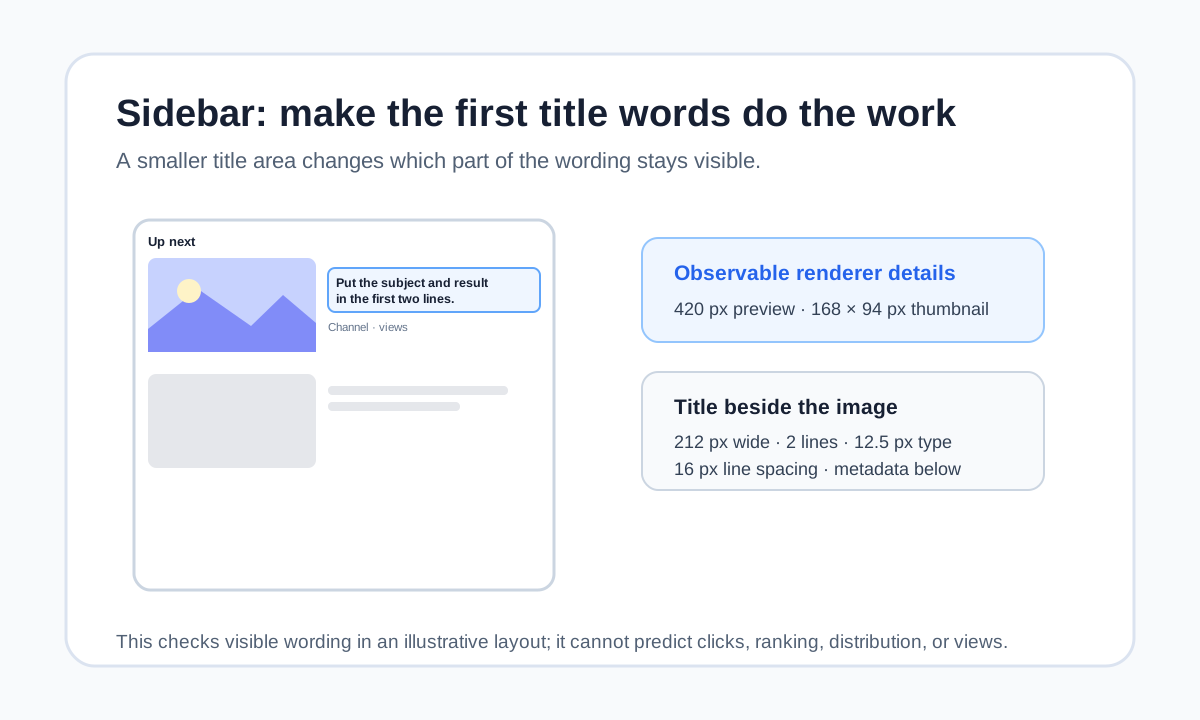
Put the identifying words in the Sidebar title area
Use the Sidebar preview to check whether the first words of a title identify a video in the narrow space beside its thumbnail. MyThumbTester’s Sidebar renderer is 420 px wide. After 14 px side padding, a 168 px thumbnail, and a 12 px gap, the title area is 212 px wide. It draws the title in bold 12.5 px type for at most two lines with 16 px line spacing, then places the channel and views metadata beneath it. Those are reproducible layout details, not predictions of clicks, ranking, distribution, or views.
Load the local image and enter the exact title. Choose Sidebar and read the two rendered title lines before reading the metadata. If the subject or outcome does not appear there, move it earlier or remove a weaker opening phrase.
Keep the thumbnail and title responsible for different parts of the idea
The thumbnail should make the basic subject visible at its 168 by 94 px size. The title can then add the result, question, constraint, or reason to care. Do not expect the metadata line to explain a title that has run out of visible space.
If the small image is unclear, revise the composition before adding more words. A longer title does not restore details that disappear at this preview size.
Record one visible revision
Keep the image fixed while you move only the title wording. Compare the same Sidebar preview and record what the first two lines show. One title change at a time makes the review reproducible and gives you a clear reason for the selected version.
Export the Sidebar PNG once the title and image convey one coherent idea. That exported preview is a record of the presentation reviewed, not an audience test.
What this preview cannot answer
A Sidebar mockup cannot show which videos a person will see beside yours, whether they will click, how YouTube will distribute the video, or how many views it will receive. Use it only to inspect title order beside a local thumbnail in MyThumbTester’s illustrative Sidebar layout.