MyThumbTester guide
Check thumbnail crop across wide and Shorts previews
Use MyThumbTester’s wide layouts and Shorts layout to see which parts of a local image remain visible after centered cover cropping.
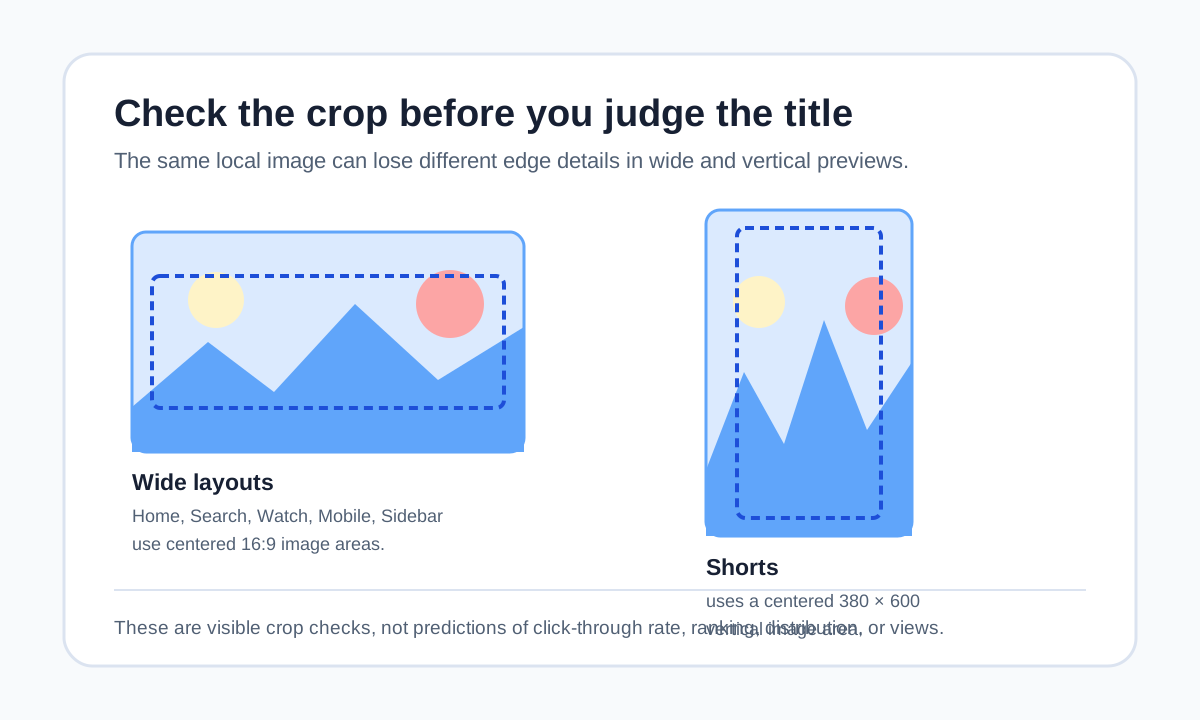
Check the crop before you judge the words
Use both a wide layout and Shorts preview before deciding that a thumbnail image carries the intended subject. MyThumbTester draws Home, Search, Watch, Mobile, and Sidebar thumbnail areas at 16:9, while the Shorts renderer draws the local image in a 380 by 600 vertical area. Its image renderer uses cover scaling and centers the image inside each area, so the edges that remain visible depend on the target shape. That is a reproducible visual constraint, not a prediction of click-through rate, ranking, distribution, or views.
Load one local image, first choose Home feed or Mobile, then switch to Shorts. Identify the subject, face, object, or text that remains inside both centered crops. If essential information disappears in one, adjust the original composition before relying on a title to restore it.
Wide previews and vertical previews ask different crop questions
In a wide 16:9 area, check whether the subject is large enough and whether important edge details have already been lost. In the vertical Shorts area, check the top, bottom, and side margins around the subject. The same image can make sense in a wide preview while hiding a key detail after the vertical crop.
This is not a request to make every image work everywhere. Choose the layout that matches the intended placement, then make sure the core message survives that layout’s centered crop.
Revise one composition decision at a time
Keep the title fixed while moving the subject, reducing edge details, or leaving more space around the important object in the source image. Return to the same two layouts and record what is still visible. Changing image and title together makes it harder to know which revision solved the visible problem.
Export the chosen preview PNG after the crop has been reviewed. The exported image records the illustrative layout you inspected; it is not an audience experiment.
What this crop check cannot answer
A preview cannot tell you which placement YouTube will choose, what a particular viewer will see, whether they will click, or how many views a video will receive. Use it only to inspect the visible crop of a local image in MyThumbTester’s illustrative layouts.